Skip to content
NV://SYS
  • noah@sys:~$ whoami
  • > status    location: ring -1
  • > focus     hypervisor · dma · fpga · embedded
  • > session   00:00:00_

Noah VanDenBurg

Low-level systems / Security research / Engineering

Hypervisors, kernel internals, FPGA hardware and debugging tools. Portfolio always in progress.

Projects

01 / 4 entries

AMD SVM Hypervisor

In progress

SVMCheck

An AMD SVM hypervisor built as a Windows kernel driver. It runs an isolated synthetic guest, handles nested page faults and MSR access in software, and exposes a small administrator-only control interface.

  • AMD SVM
  • Windows kernel
  • Nested paging
  • C++
  • x64 assembly
Execution model
Runs a synthetic guest to completion on a pinned CPU, then returns to Windows. Windows is never the guest, so no request can observe a guest mid-run.
VMRUN on every processor
Each logical processor gets its own VMCB, host-state area, and I/O and MSR permission maps. The driver pins to each CPU in turn, performs a VMRUN round trip, and reports how many completed. It requires NRIPS support and validates the next-RIP value before resuming.
Intercepts
All 32 exception vectors and shutdown return to the host as safe exits instead of cascading toward a machine reset. MSR access goes through an explicit permission map: selected MSRs are emulated against saved guest state, and invalid writes inject #GP(0) into the guest.
Nested paging
The nested page fault handler fails closed by default. Faults inside allow-listed identity windows are resolved on demand with exactly the requested permission, capped by a per-window ceiling. 2 MB leaves are split on a fault so permissions stay enforceable page by page.
Controller interface
A versioned hypercall ABI answers a reserved CPUID range (0x40000000–0x400000FF) in software. An administrator-only device, \\.\SvmHv, offers a status query and read-only guest-physical reads of at most 4096 bytes, allowed only where the nested page table maps the memory.
Testing
Host-side policy suites (2,661 nested-paging checks, 75 ABI checks, 16 page-walk checks) plus tests on real hardware. A six-case negative IOCTL battery covering bad versions, oversize lengths and address overflow passes against the live driver, and every rejection returns a defined status instead of crashing.

Main architect · October 2026

Driver log · DbgView output
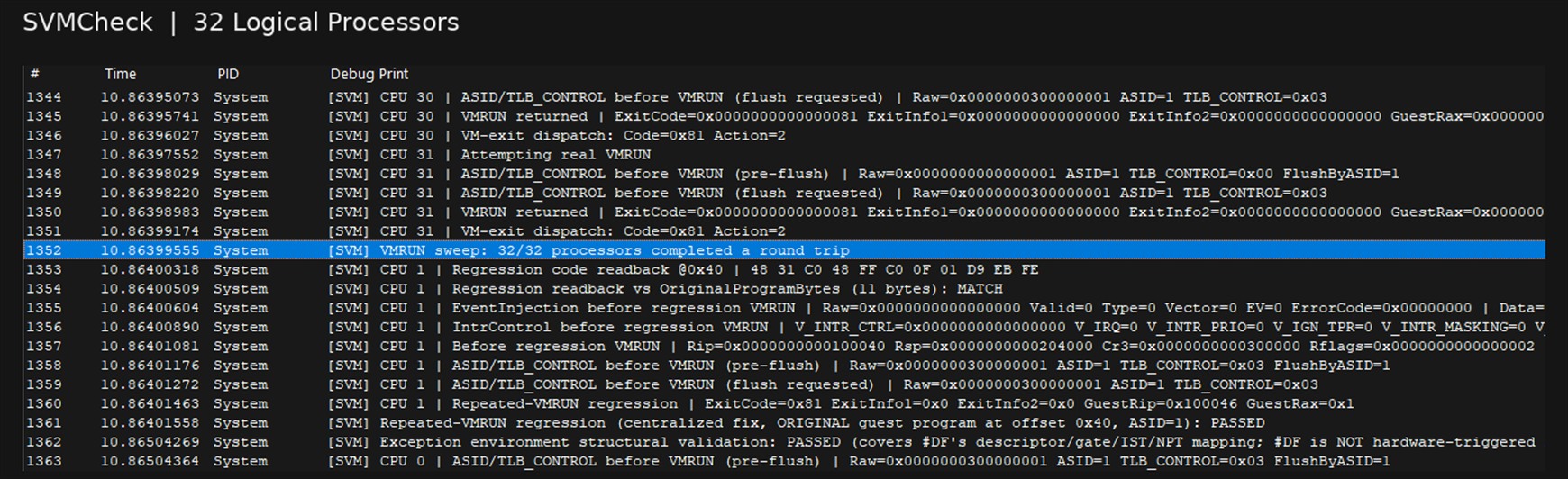
DbgView log titled SVMCheck, 32 Logical Processors. Per-CPU lines show VMRUN returning exit code 0x81 and the exit being dispatched. The highlighted line reads: VMRUN sweep: 32/32 processors completed a round trip. It is followed by the repeated-VMRUN regression and the exception environment validation, both PASSED.
Every one of the 32 logical processors enters the guest with VMRUN and comes back with a VMMCALL exit (code 0x81). The sweep line reads 32/32, and the repeated-VMRUN regression and the exception-environment check pass right after.

Excerpt from the DbgView window, cropped.
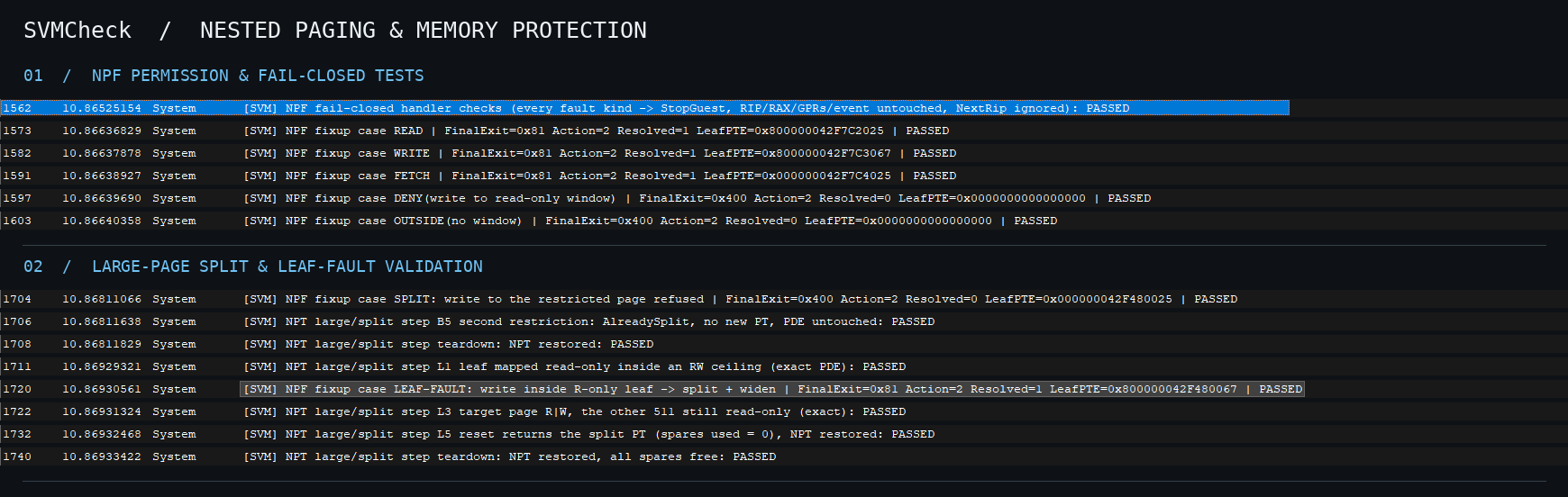
DbgView log titled Nested Paging and Memory Protection. Section one, NPF permission and fail-closed tests: READ, WRITE and FETCH faults are resolved, a write to a read-only window and an access outside any window are not resolved, all PASSED. Section two, large-page split and leaf-fault validation: a write inside a read-only leaf splits it and widens one page, the other 511 stay read-only, and teardown restores the page tables, all PASSED.
Read, write and fetch faults inside an allowed window are resolved with exactly the requested permission. A write to a read-only window and an access outside any window are refused. A write inside a read-only 2 MB leaf splits it and widens one page, and the other 511 pages stay read-only.

Excerpts from the DbgView window, arranged by topic.

DbgView log titled VM-Exit Handling and MSR Interception. Guest exception injection: a page-fault test with vector 14 ending in a VMMCALL exit. MSR read interception: an RDMSR of 0xC0000080 with ValueOk=1. LSTAR WRMSR and RDMSR round trip: the value read back, 0xFFFF800012345678, equals the value in the VMCB.
A guest page fault (vector 14) runs through the guest's own exception environment and the test still ends with a clean VMMCALL exit. A guest MSR read (EFER, 0xC0000080) is intercepted and served from saved guest state. The value written to LSTAR reads back identically from the guest and from the VMCB.

Excerpts from the DbgView window, arranged by topic.
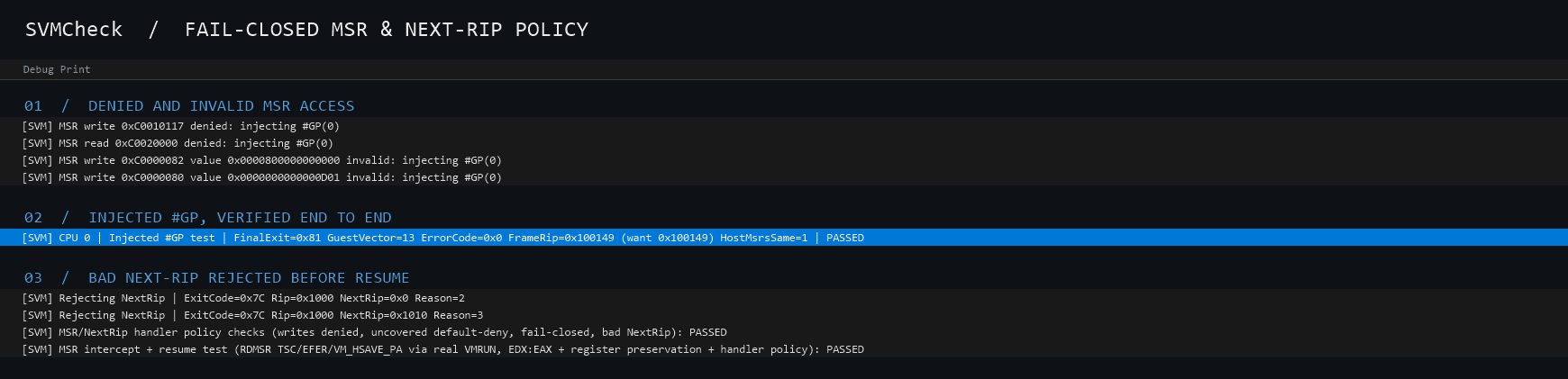
Log excerpt titled Fail-Closed MSR and Next-RIP Policy. Denied and invalid MSR accesses each inject a general protection fault: a write to 0xC0010117 and a read of 0xC0020000 are denied, and writes to LSTAR with a non-canonical value and to EFER with an invalid value are rejected. The injected #GP test passes with vector 13, the expected frame RIP and host MSRs unchanged. Bad next-RIP values are rejected, and the MSR and next-RIP policy checks and the MSR intercept and resume test pass.
Writes to protected MSRs, reads of MSRs outside the permission map, and invalid values (such as a non-canonical LSTAR) inject #GP(0) into the guest and never reach the host. The injected #GP is checked end to end: vector 13, the expected frame RIP, host MSRs unchanged. A bad next-RIP value from the CPU is rejected before any resume.

Rendered from the exported DbgView log, Debug Print column only.
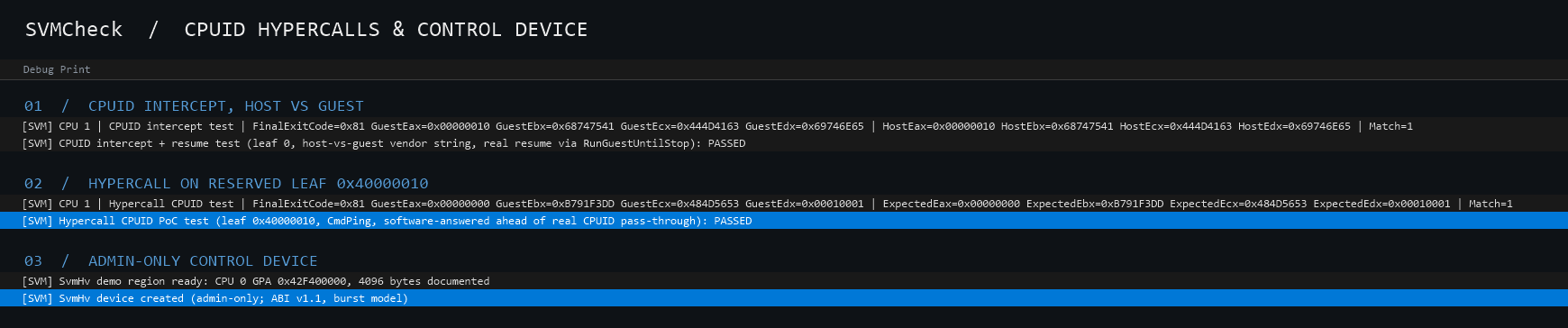
Log excerpt titled CPUID Hypercalls and Control Device. A CPUID intercept test shows the guest receiving the same vendor string registers as the host, Match=1. A hypercall CPUID test on reserved leaf 0x40000010 with CmdPing shows the guest registers equal to the expected values, Match=1, and the hypercall proof of concept test passes. Finally the SvmHv demo region is ready and the admin-only SvmHv device is created with ABI v1.1 in the burst model.
The guest runs CPUID on the reserved leaf 0x40000010 (Ping). The hypervisor answers it in software, before the real CPUID is consulted, and every register the guest receives matches the host-side reference (Match=1). A normal CPUID intercept above it gives the guest the same vendor-string registers as the host. The admin-only control device is created only after every guest run has finished.

Rendered from the exported DbgView log, Debug Print column only.
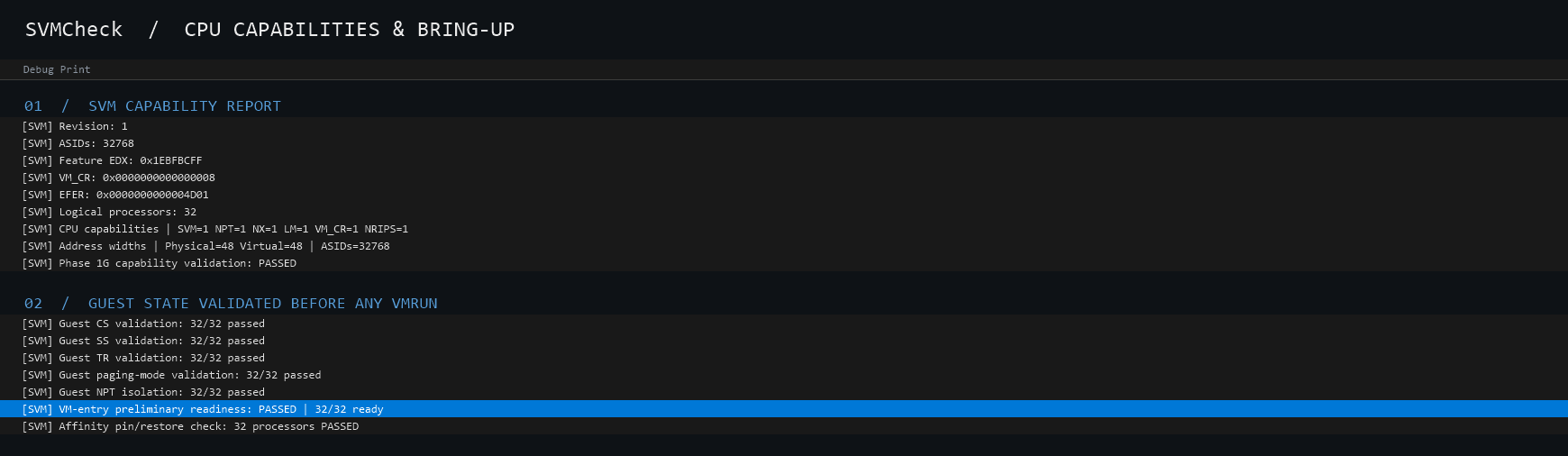
Log excerpt titled CPU Capabilities and Bring-Up. The SVM capability report lists revision 1, 32768 ASIDs, the feature bits, VM_CR, EFER and 32 logical processors, then SVM, nested paging, NX, long mode, VM_CR and NRIPS all present, 48-bit physical and virtual address widths, and capability validation passing. Below it, guest CS, SS, TR, paging-mode and nested-page-table isolation checks each pass 32 of 32, the VM-entry readiness check passes 32 of 32, and the CPU affinity pin and restore check passes for 32 processors.
The driver reports the CPU's SVM revision, ASID count and feature bits, confirms SVM, nested paging, NX, long mode and NRIPS support, then validates each guest's segment, paging and nested-page-table isolation state before any VMRUN. Every per-processor check reads 32/32.

Rendered from the exported DbgView log, Debug Print column only.
  1. FPGA / DMA Memory Research

    MW4DMA

    FPGA-based DMA memory access and reverse engineering.

    • FPGA
    • DMA
    • Reverse engineering
    [ROLE · YEAR · STATUS]
  2. Offline Python IDE & Debugger

    ZotGDB

    An ad-free, OnlineGDB-style Python IDE for UCI courses that runs entirely in the browser with no CDNs, so it works offline. Python runs in a Web Worker through Pyodide, with a step debugger, an interactive terminal and Matplotlib and NumPy support. A Raspberry Pi serves the files and logs network and security events.

    • Python
    • Pyodide
    • WebAssembly
    • JavaScript
    • Raspberry Pi
    • Debugger
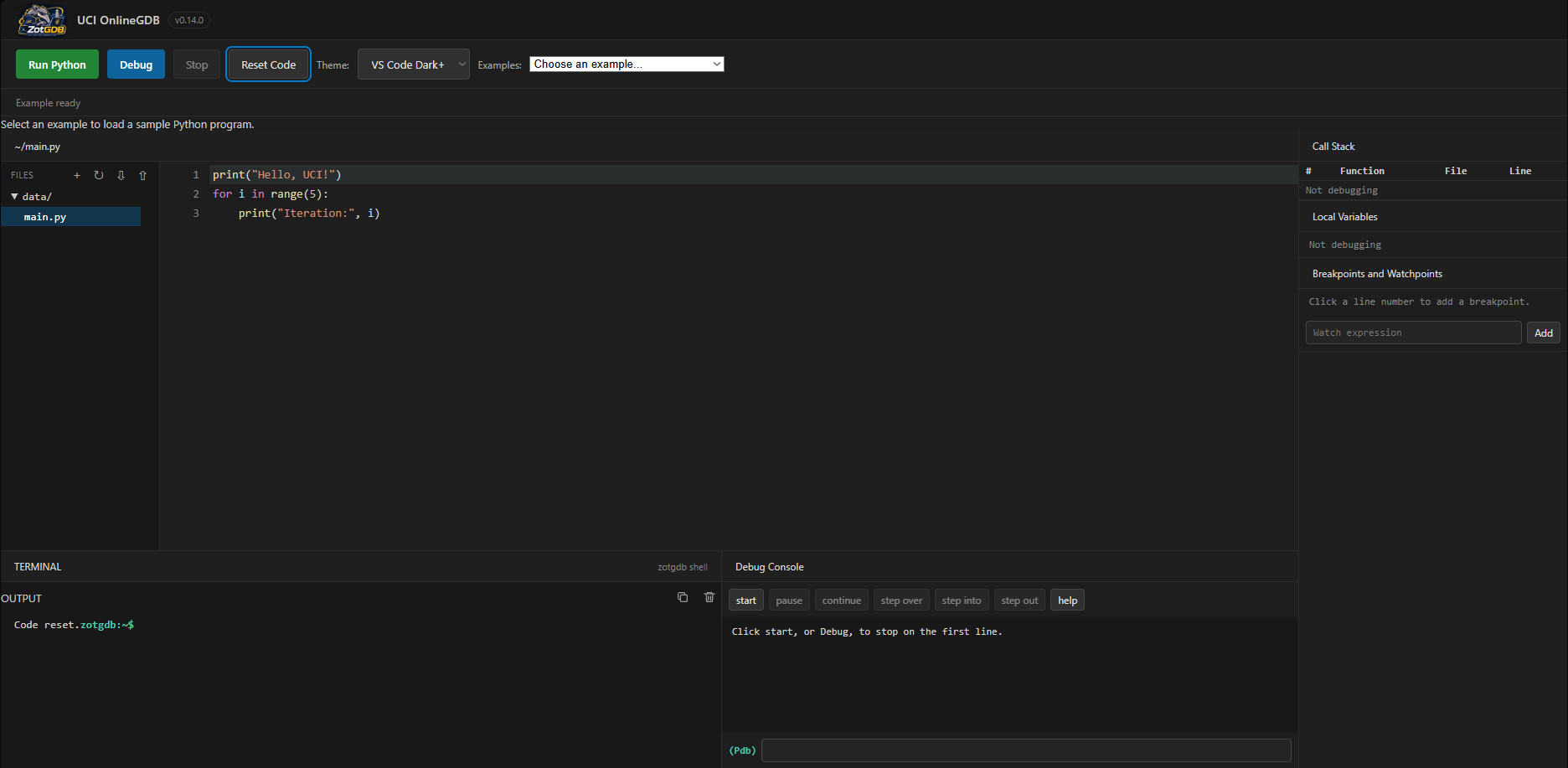
    • ZotGDB as it opens. Toolbar with Run Python, Debug, Stop and Reset Code buttons, a theme selector and an examples dropdown. A file tree with main.py sits left of the editor, which holds a three-line program that prints Hello, UCI! and loops five times. The right side has empty Call Stack, Local Variables and Breakpoints panels. Below are a terminal with a zotgdb shell prompt and a Debug Console with start, pause, continue, step over, step into, step out and help buttons.

      Base

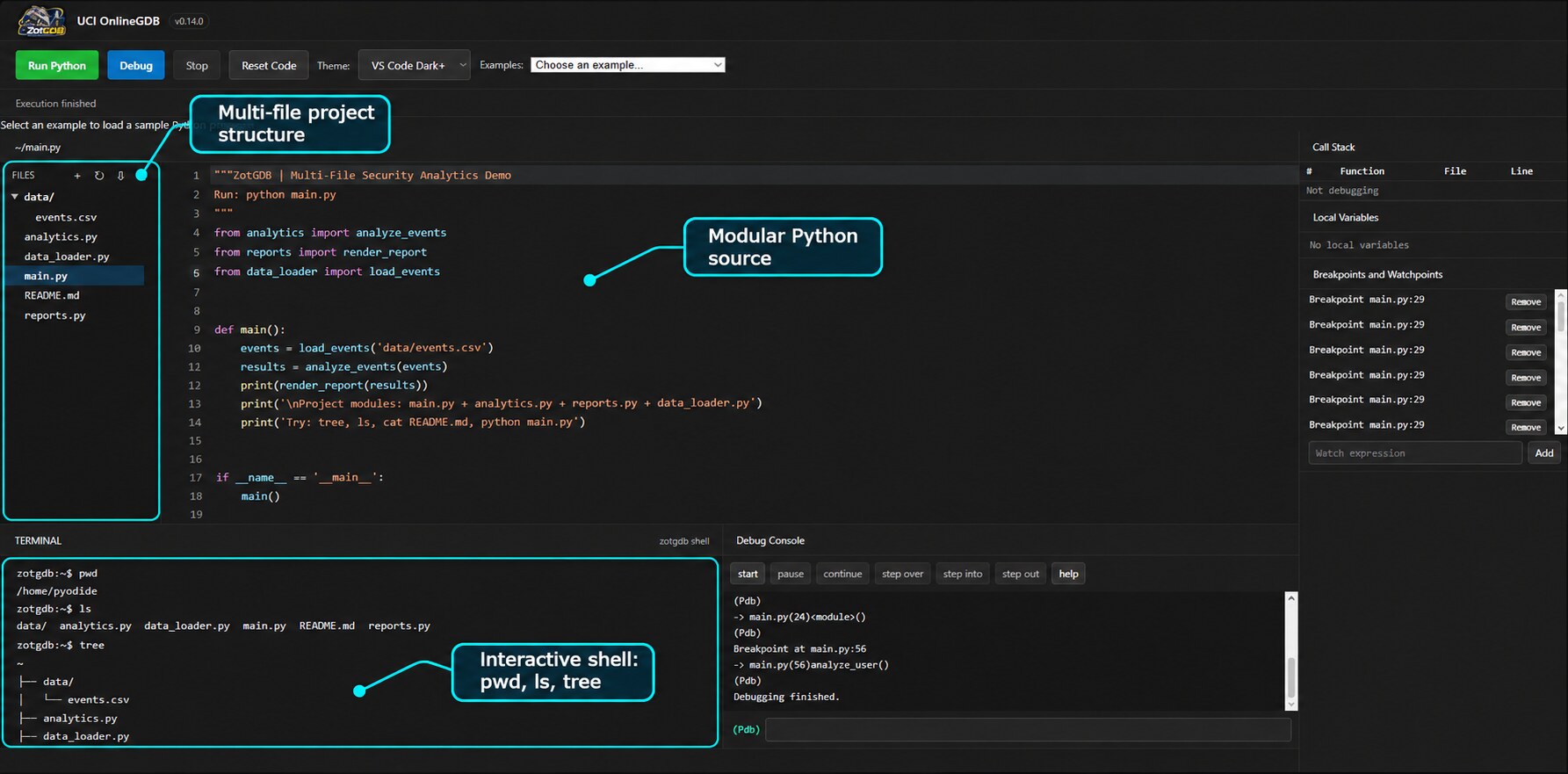
    • ZotGDB with a multi-file project. The file tree lists a data folder containing events.csv, plus analytics.py, data_loader.py, main.py, README.md and reports.py. main.py imports from the other modules. The terminal shows an interactive shell running pwd, ls and tree. Callouts label the multi-file project structure, the modular Python source and the interactive shell.

      Multi-file

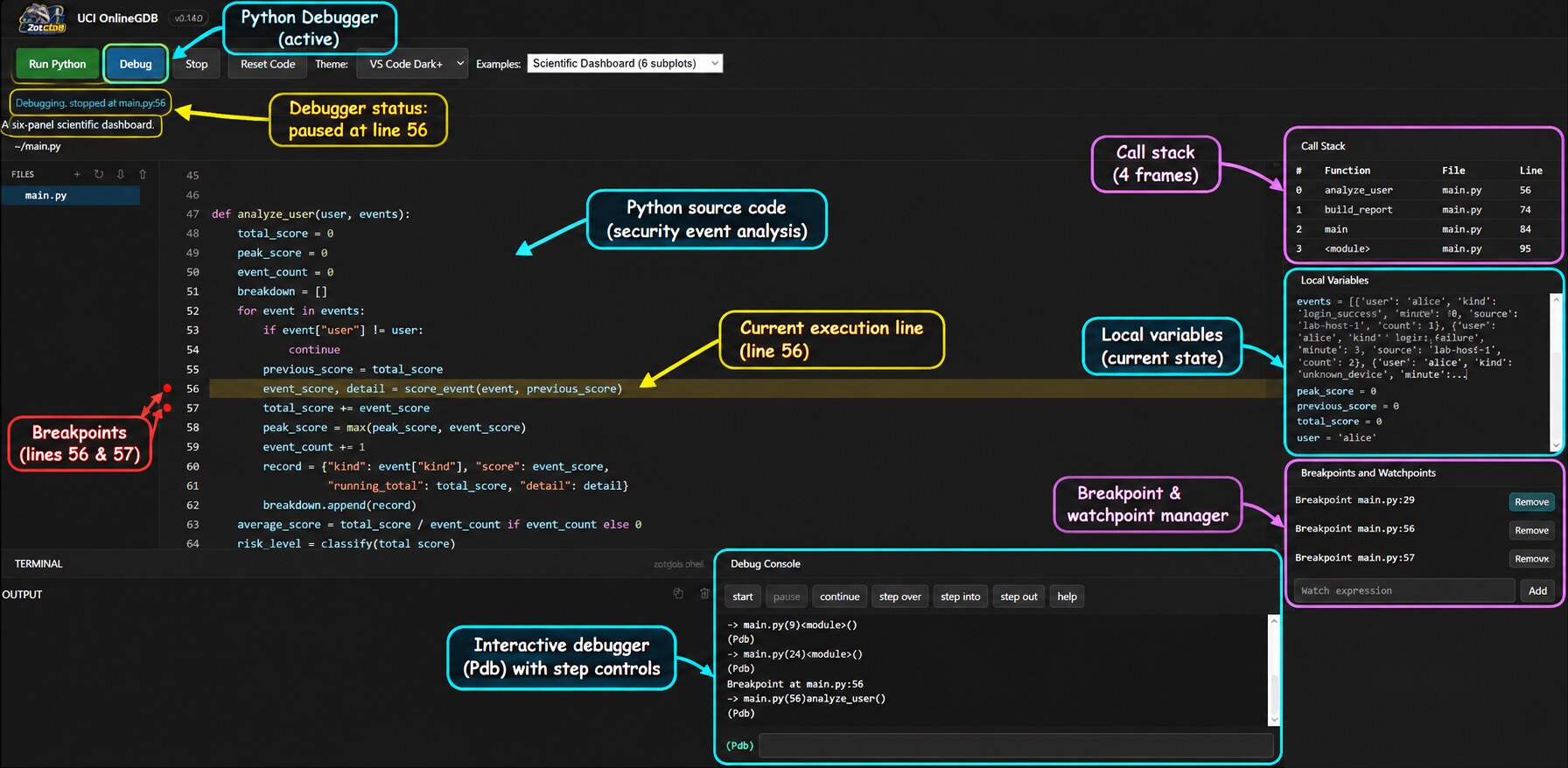
    • ZotGDB paused in debug mode at line 56 of main.py inside analyze_user. The status line reads Debugging, stopped at main.py:56, breakpoints are set on lines 56 and 57 and the current line is highlighted. The right side shows a four-frame call stack, local variables and the breakpoint and watchpoint manager. The Debug Console shows pdb output with step controls. Callouts label each part.

      Debugger

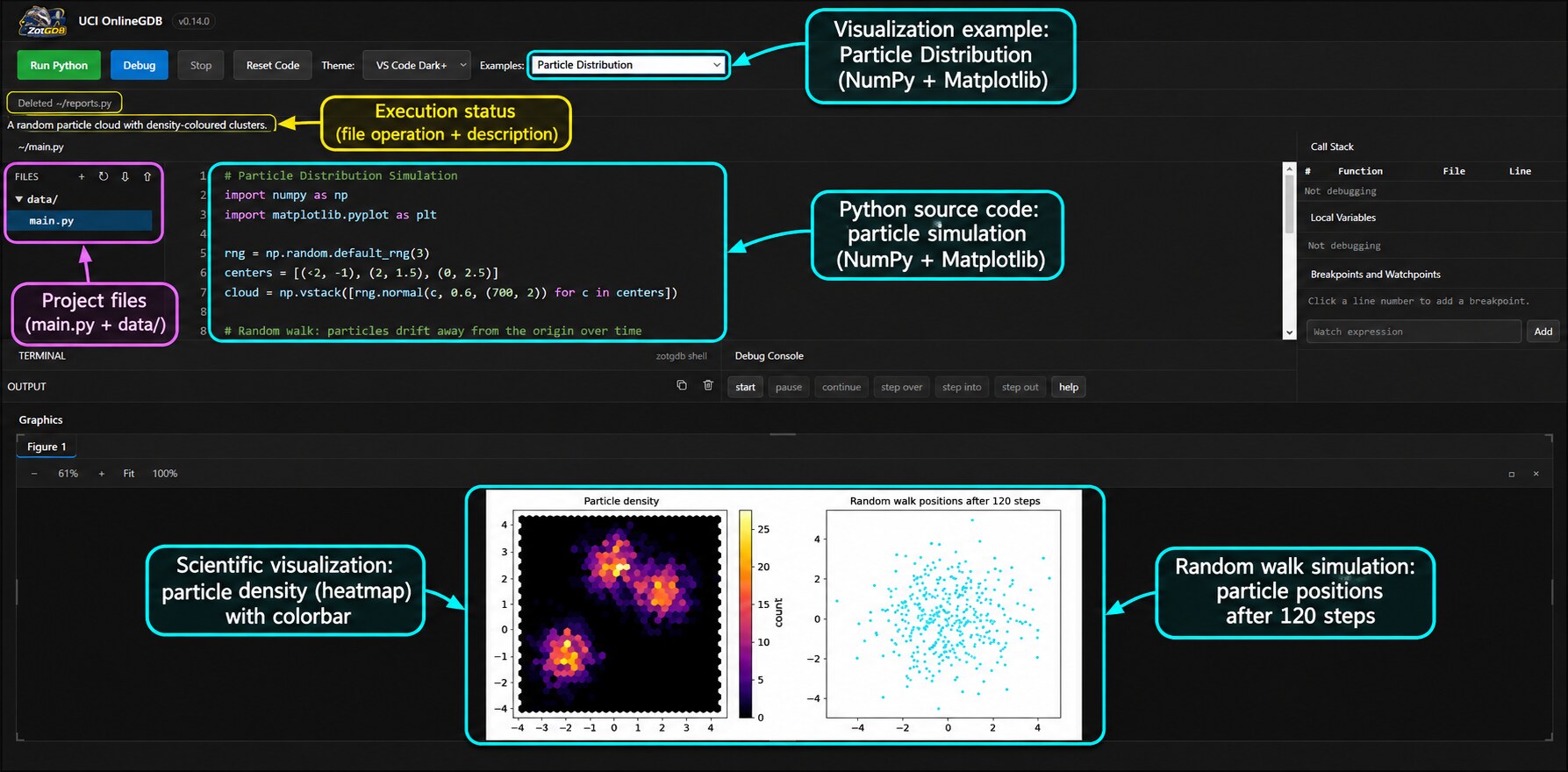
    • ZotGDB running the Particle Distribution example. The editor shows NumPy and Matplotlib code. The Graphics panel shows Figure 1 with two plots: a hexbin particle density heatmap with a colorbar and a scatter plot of random walk positions after 120 steps. Callouts label the example, the source code and both plots.

      Matplotlib

    Senior design · team of 3 · October – November 2026
  3. Unreal Engine 5 Overlay

    HoodWarfareDLL

    A C++ module that runs inside an Unreal Engine 5 game and draws a Direct3D 12 overlay with an ImGui menu. It reads the engine's own object and name tables to work with live game state, using direct in-process memory access.

    • C++
    • Unreal Engine 5
    • Direct3D 12
    • ImGui
    • Reverse engineering
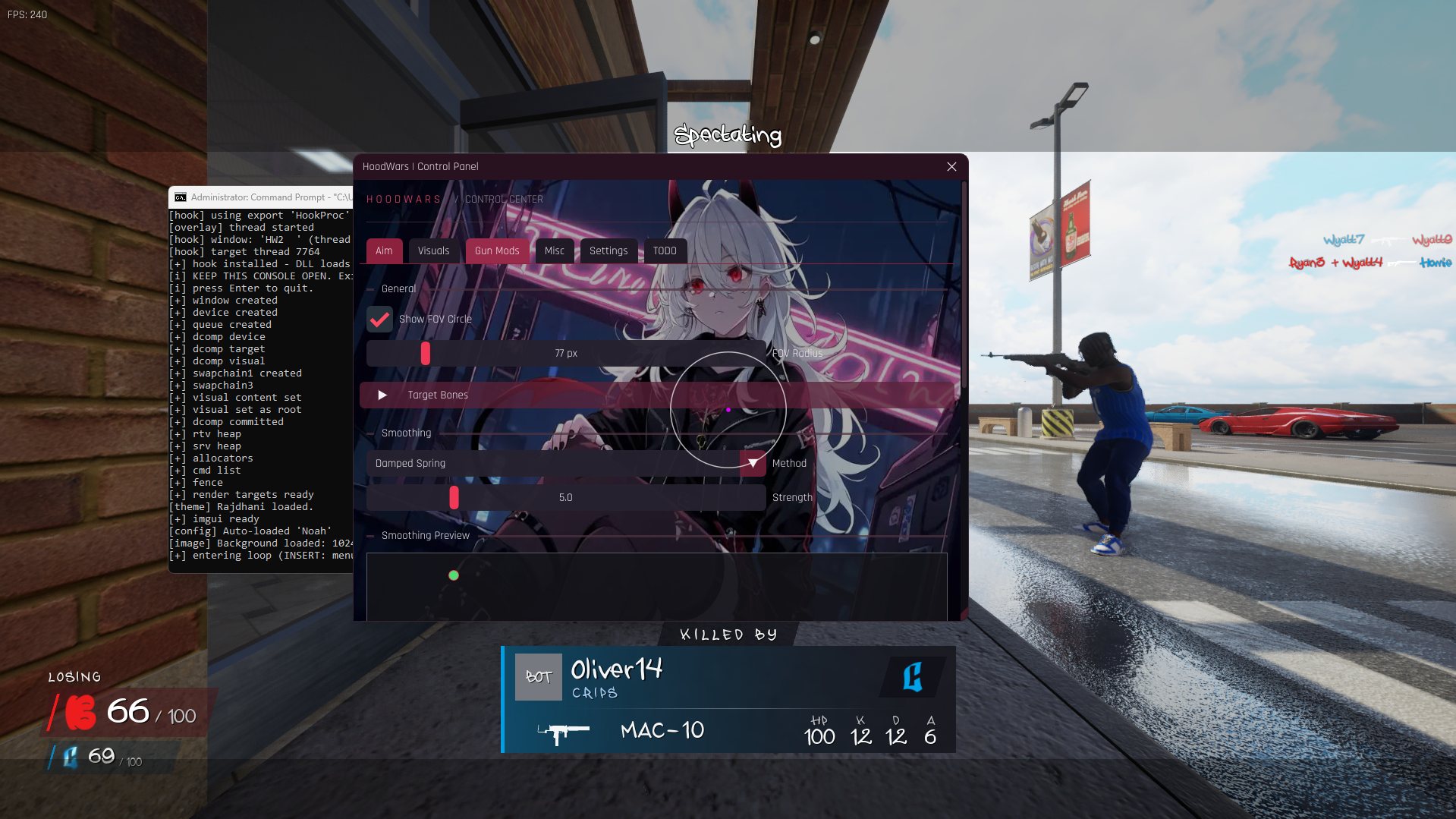
    • HoodWarfareDLL control panel on the Aim tab, drawn over the game. Controls: Show FOV Circle checkbox, FOV Radius slider at 77 px, Target Bones, and a smoothing section with a Damped Spring method and a Strength slider at 5.0. A console window beside the menu logs the hook and Direct3D 12 setup.

      Aim

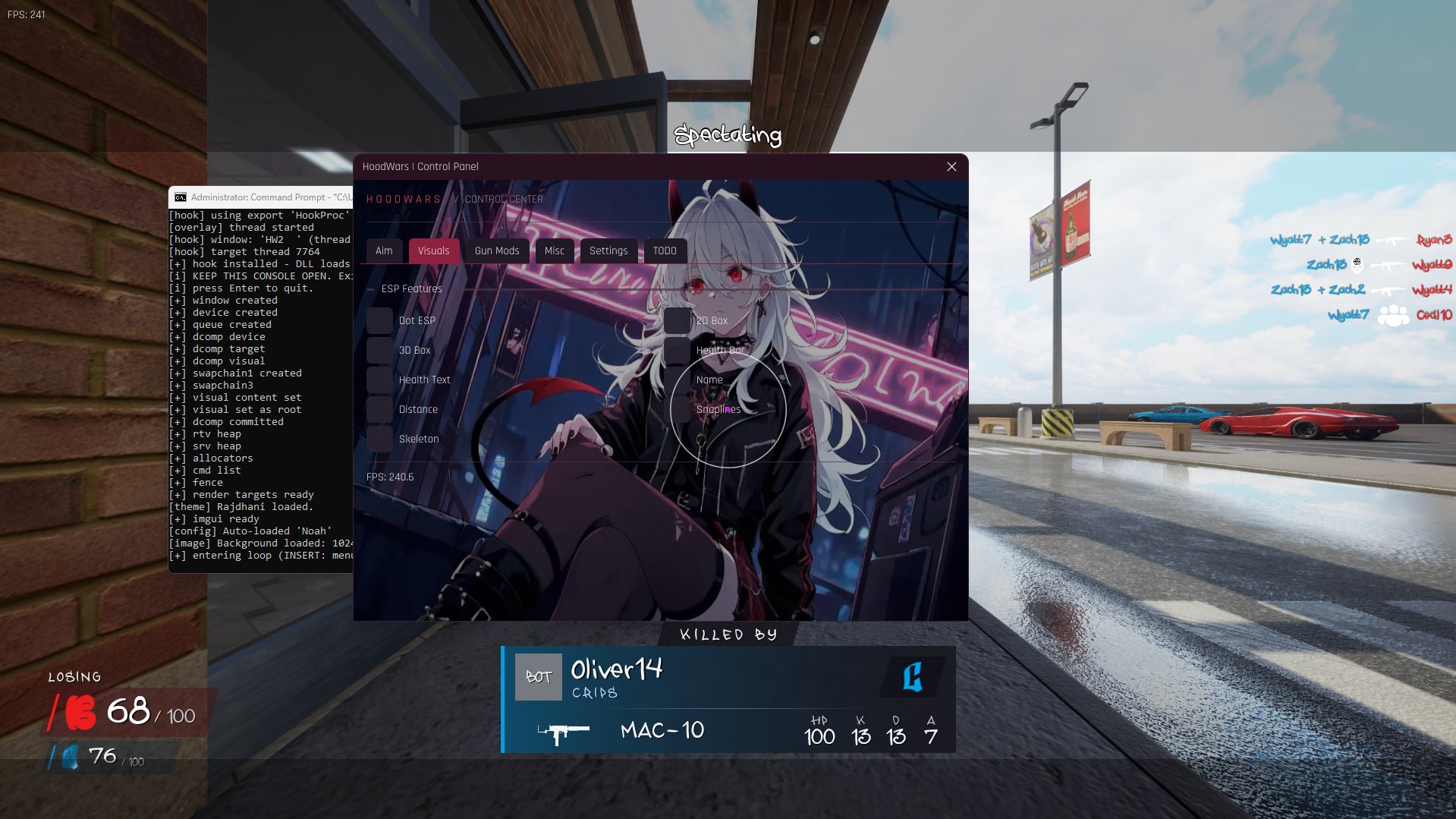
    • HoodWarfareDLL control panel on the Visuals tab. ESP Features checkboxes: Dot ESP, 3D Box, Health Text, Distance, Skeleton, 2D Box, Health Bar, Name and Snaplines.

      Visuals

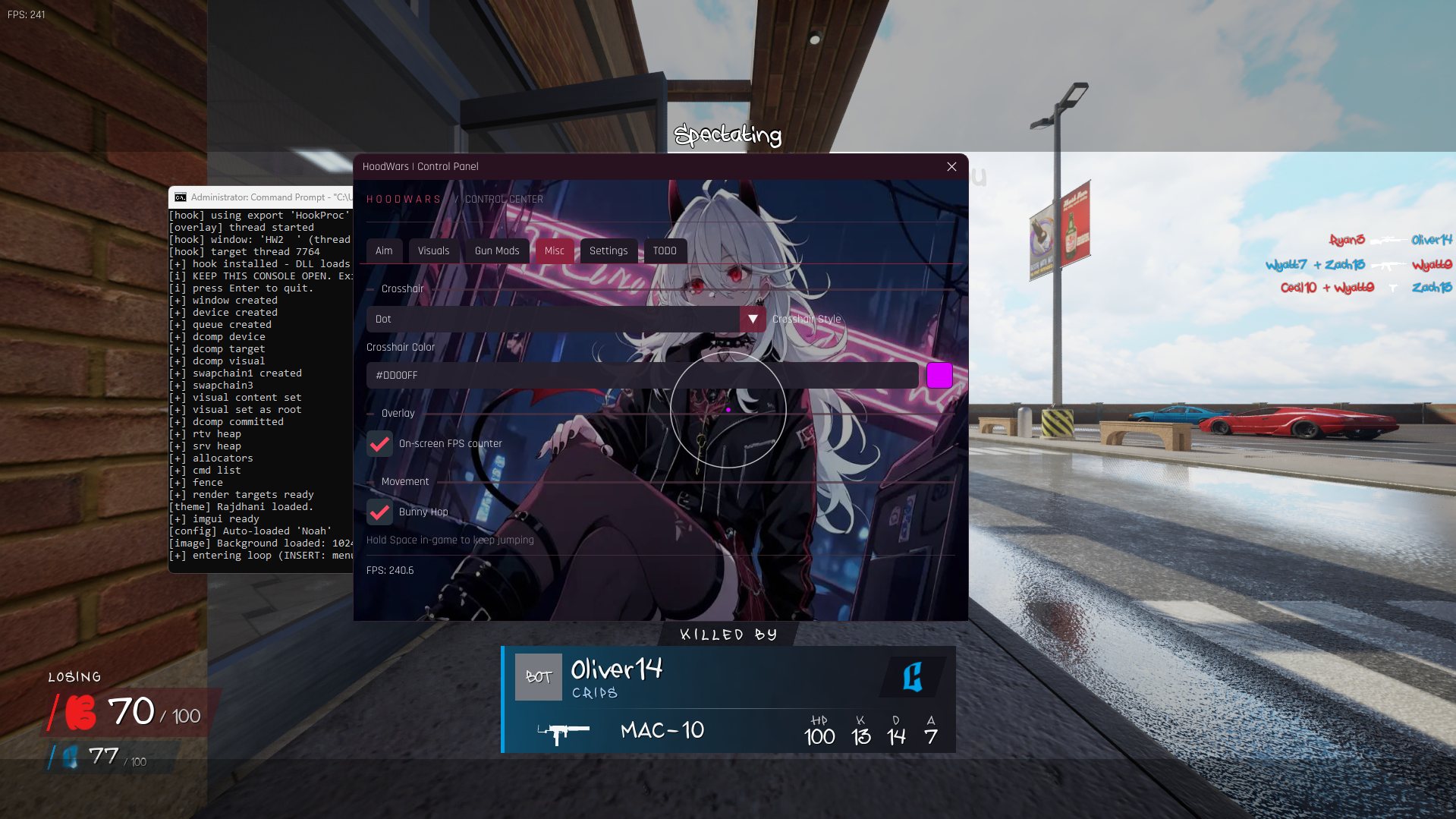
    • HoodWarfareDLL control panel on the Misc tab. Crosshair style set to Dot, crosshair color field reading #DD00FF, an on-screen FPS counter checkbox, and a Bunny Hop checkbox.

      Misc

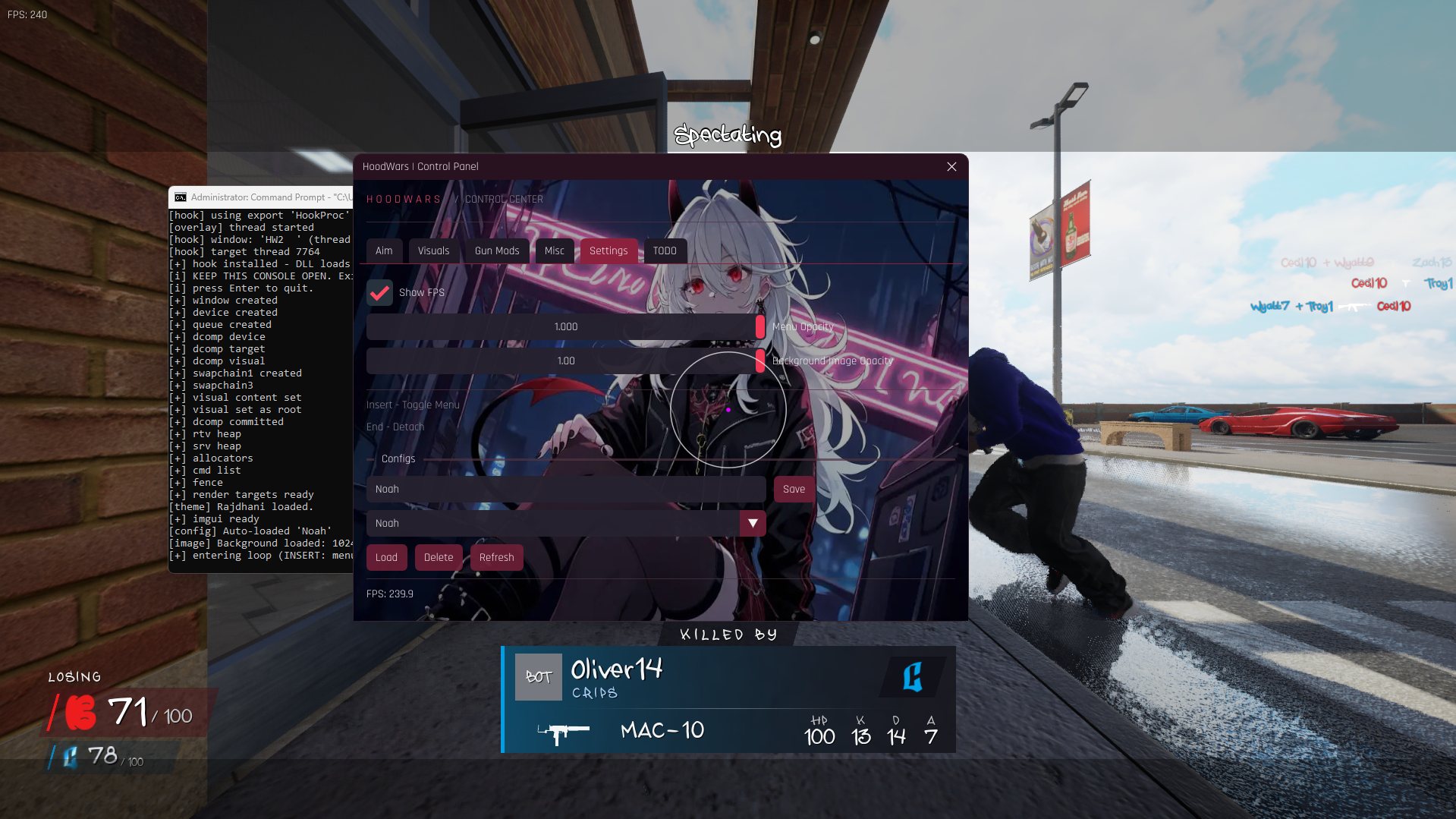
    • HoodWarfareDLL control panel on the Settings tab. Show FPS checkbox, menu opacity and background image opacity sliders, key hints (Insert toggles the menu, End detaches), and a Configs section with a name field, Save, a saved-config dropdown, Load, Delete and Refresh buttons.

      Settings

    Sole Developer · October 2026

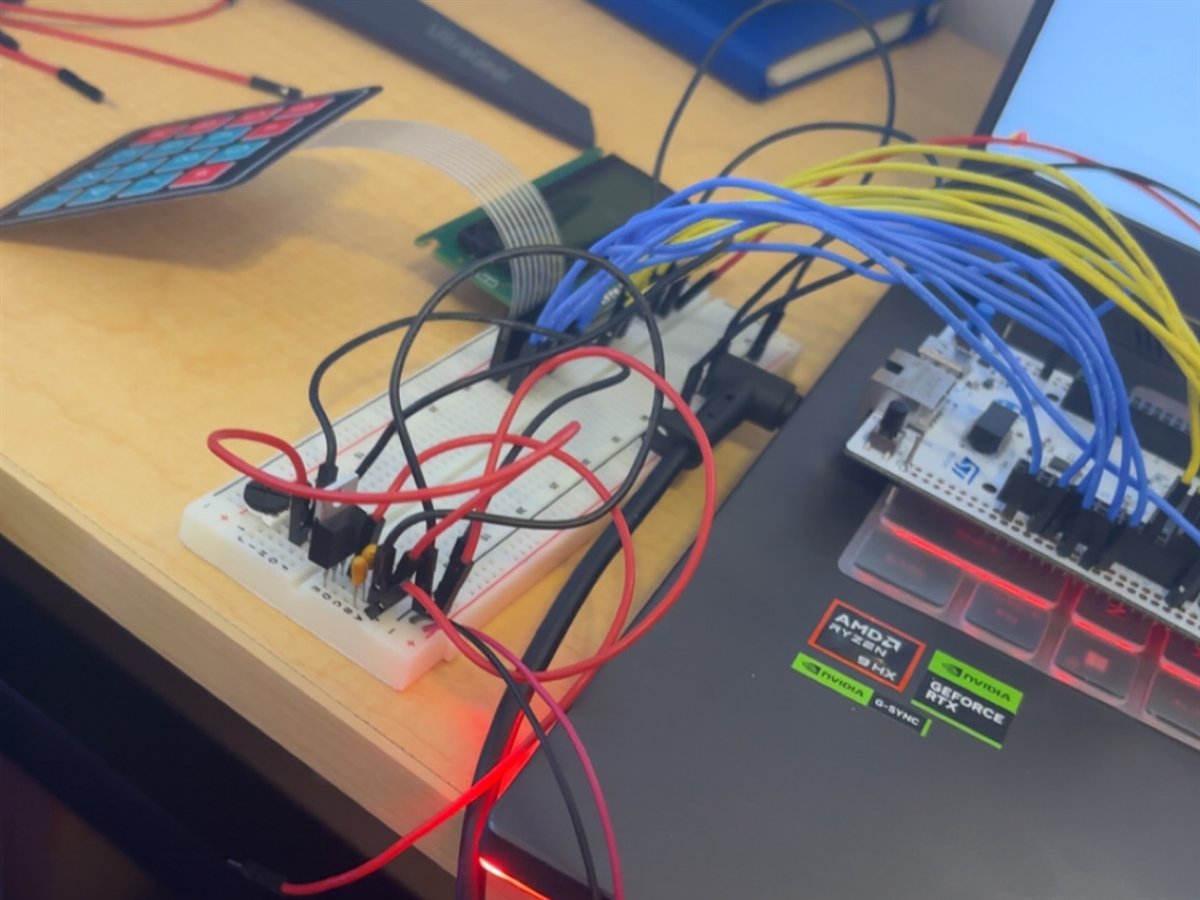
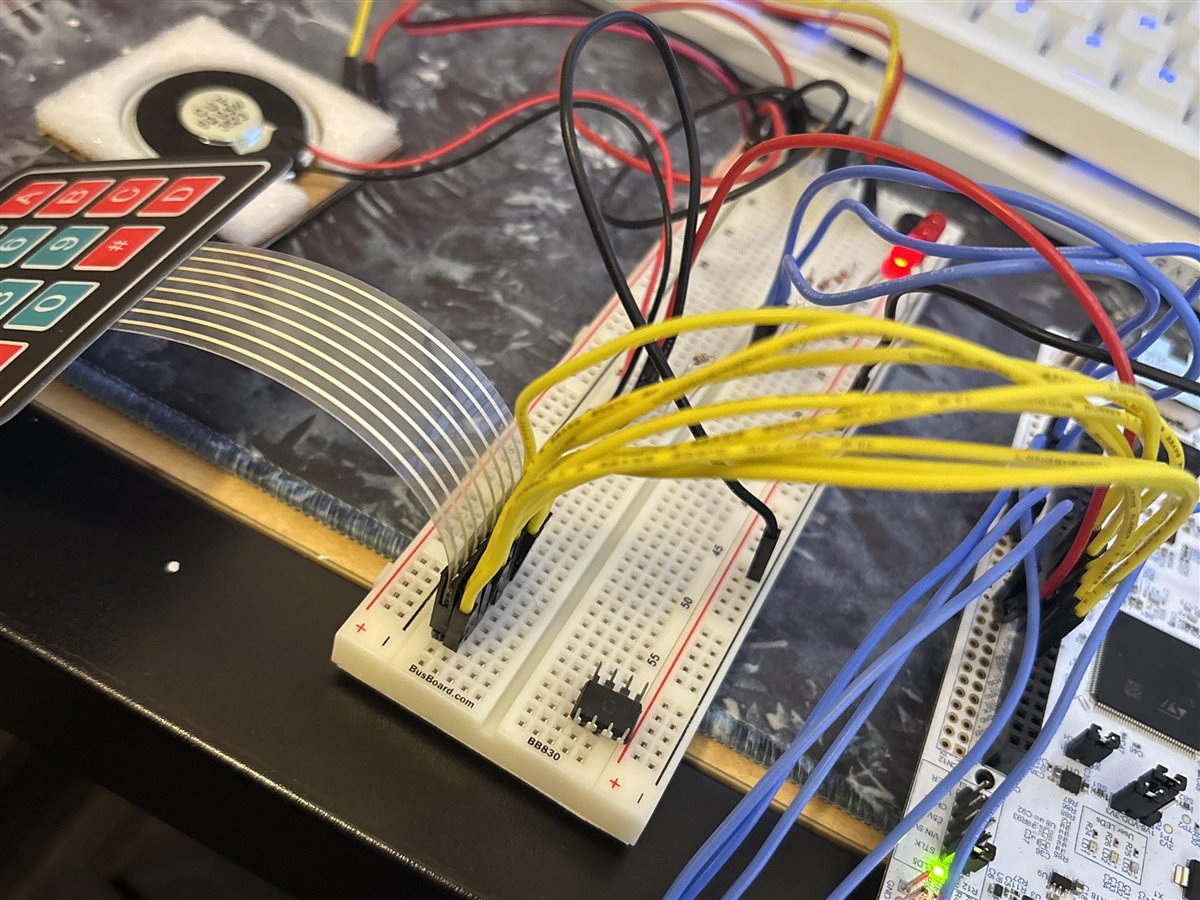
Embedded · NUCLEO-H563ZI

Bare-metal calculator

A calculator built on the NUCLEO-H563ZI with a keypad for input and an LCD for output, programmed from the datasheet and programming manual. Also drove a small speaker to make it buzz.

  • Keypad input
  • LCD output
  • Speaker / buzzer
  • Datasheet-driven
Course · March 2026
UCI COMPSCI 145 · Embedded Software
Language
C
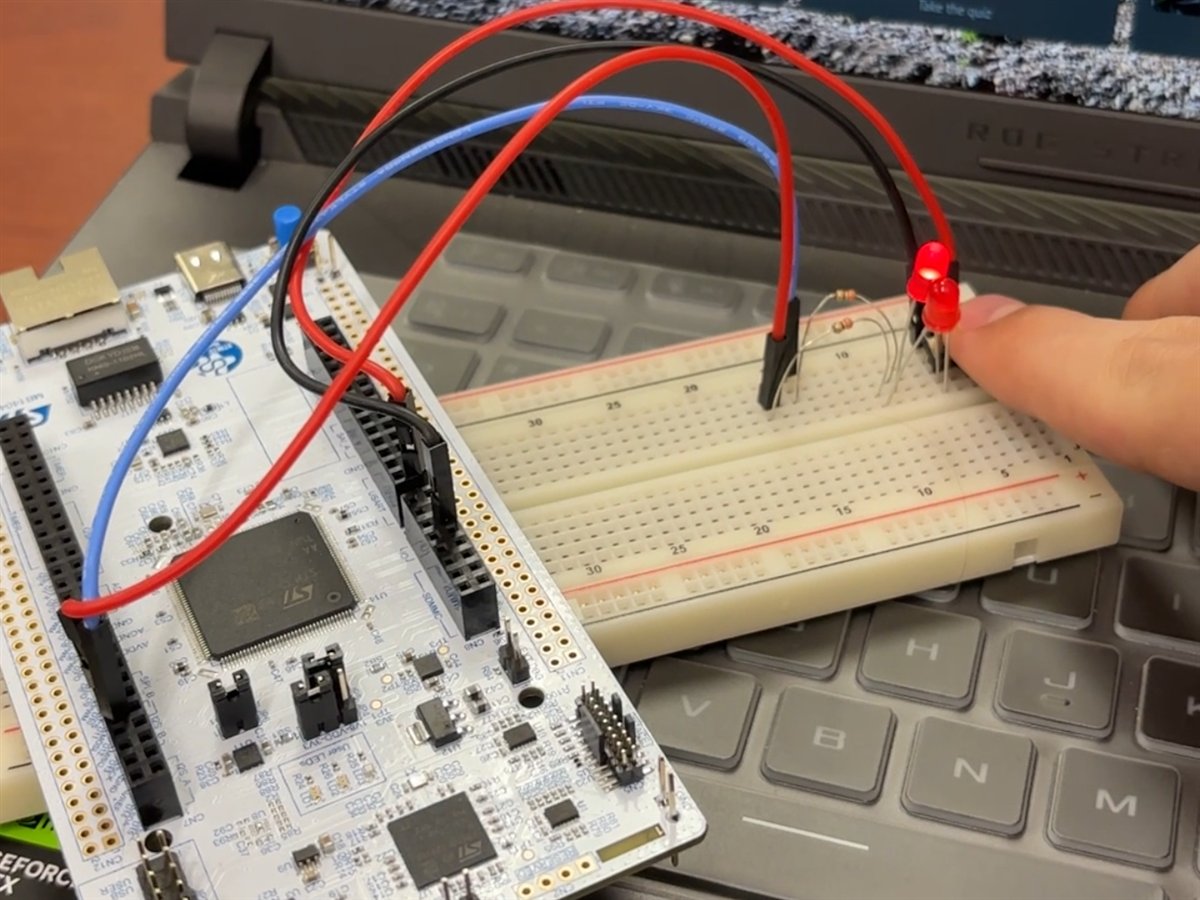
  • NUCLEO-H563ZI board connected by jumper wires to a breadboard with two red LEDs lit
  • Keypad and LCD module wired through a breadboard and many jumper wires to the NUCLEO-H563ZI board
  • Close view of the calculator build: keypad ribbon cable and speaker on the left, breadboard in the middle, yellow and blue jumper wires running to the NUCLEO-H563ZI

Research

02 / Index

Walkthroughs are published on GuidedHacking ↗

About

03 / Profile

Computer Science & Engineering student at the University of California, Irvine, focused on low-level systems and security research. Member of Cyber Club @ UCI.

Location
Irvine, CA
Graduation
Expected June 2027
Focus
Hypervisors, kernel, FPGA, reverse engineering

Education

Experience

Skills

Proficient

Languages

  • C++
  • x86-64 Assembly
  • C
  • C#
  • Python
  • Verilog
  • Markdown

Systems

  • AMD SVM
  • Windows kernel
  • DMA
  • RISC-V
  • Unreal Engine 5
  • DirectX

Embedded

  • Bare-metal programming
  • Embedded software
  • NUCLEO-H563ZI
  • STM32CubeIDE
  • Raspberry Pi 5

FPGA & hardware

  • FPGA
  • Vivado

Reverse engineering

  • Reverse engineering
  • Debugging
  • IDA Pro
  • Ghidra
  • WinDbg
  • x64dbg / x32dbg
  • ReClass
  • Unicorn Engine

Environments

  • Unix
  • Ubuntu / Kali Linux
  • Command line interface
  • Git
04 / Contact

Let'sTalk